School profile pages

Update one school profile. Help families see the right details.

SchoolBuilder is the school profile editor that keeps one record for each school (contacts, grades, photos and About text) and feeds it to SchoolMap, SchoolCompare, TourBook and the school directory.

Free for 90 days, no credit card. Sign in within 14 days to keep it. If you buy, everything you set up stays.

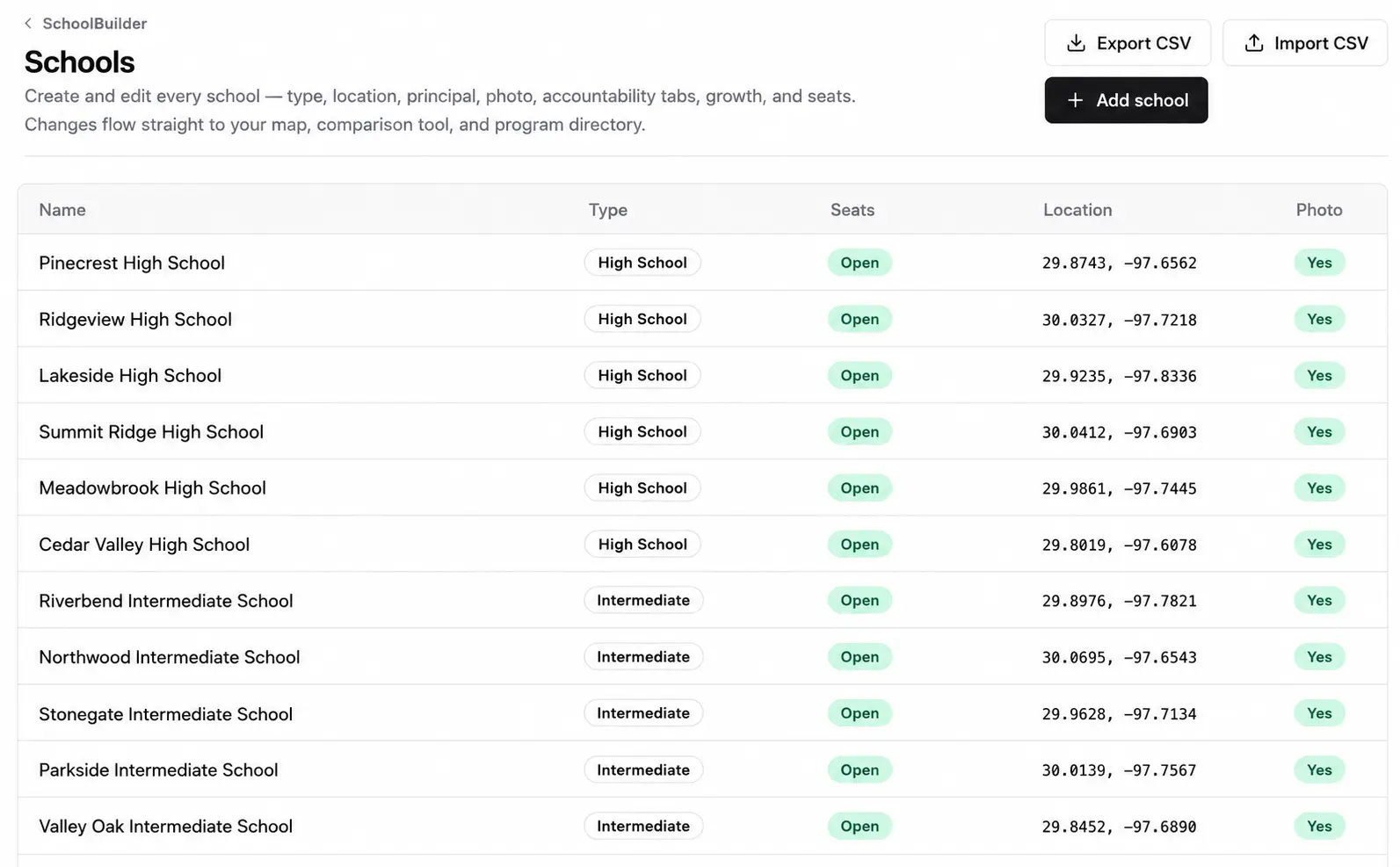
SchoolBuilder admin: the district's schools listed with type, seat availability, location, and photo status. These shared school profiles feed connected tools.

Try it right here

Change one detail. Check the family profile.

Change a detail in this school profile and watch the family view update.

Interactive example · a Maplewood school profile

What staff review

One school’s About text

Try adding “School tours are available by appointment.” Then check the family card.

Type a detail, then press Update.

What families see

Maplewood Elementary

Example campus · Grades K–5

About our school

Families can explore our library, arts, and outdoor learning spaces.

Edit a school once in SchoolBuilder and the update shows up on SchoolMap, SchoolCompare and your school directory.

Then try SchoolBuilder with your own district.

Your free 90-day trial includes all 11 tools, set up with your schools. Three steps to see it working:

  1. Step 1

    Choose one school

    Your trial starts with your district’s schools already loaded. Pick one and review its name, grades, location and contacts.

  2. Step 2

    Update a detail

    Edit the school’s profile in SchoolBuilder and save. Add its programs in ProgramDirectory.

  3. Step 3

    See it everywhere

    Open SchoolMap or the school directory and find the same school, already showing your change.

Bringing in IT or purchasing? Share our data practices, accessibility statement and subscription terms with your team.

One source of truth, instead of a dozen copies of the same list

In most districts, school information lives in a dozen places (the website, a PDF, a spreadsheet, the enrollment portal) and they're never quite the same. SchoolBuilder is the one place those school profiles live. Build a school by hand or bulk-import your whole district from a spreadsheet, then let connected tools reuse the relevant fields. Parents never see SchoolBuilder directly. They see the current map, comparison, school directory, and tour experience it supports, all built to a WCAG 2.2 AA target.

  • Change it once, it changes everywhere

    Enter every school a single time: names, grades, locations, photos, contacts, seats, academic indicators, and highlights. Update a principal or phone number once and connected family-facing tools reflect it. No keeping a dozen school lists in sync by hand.

  • Live seat availability families can trust

    Mark each school Open, Filling Up, At Capacity, or Waitlist Open. Parents see the real status the moment you change it. The seats they're weighing are the seats you actually have.

  • School profiles that show what makes each campus distinct

    Maintain grade spans, academic indicators, highlights, seat status, and enrollment links for each campus. Program records, eligibility, and school assignments live in ProgramDirectory, which connects them to these school profiles.

Set up once, stays in sync

Part of one connected suite

SchoolBuilder works with every other DistrictMapper tool, from the map families start on to the tour request that ends in enrollment. Set up your schools and brand once, and every tool stays in sync.

  • WCAG 2.2 AA target
  • Setup help included
  • $2,500/year to $20,000/year, by enrollment

See it working with your real schools.

Spin up a free 90-day trial built from your real district. Enter your email and we'll send a sign-in link once it's ready. No sales call required.

Start a free 90-day trial

A 30-minute demo, with your district in mind.

The live map, every tool, and your exact price. Bring your colleagues.

Book a demo