For public school district communications and enrollment teams
Help families choose your schools, on tools every family can use.
Find your district to preview its school map and annual price. No signup.
Built from public NCES data. Your district chooses the final schools and content.
- WCAG 2.2 AA target
- Setup help included
- $2,500/year to $20,000/year, by enrollment
See it working
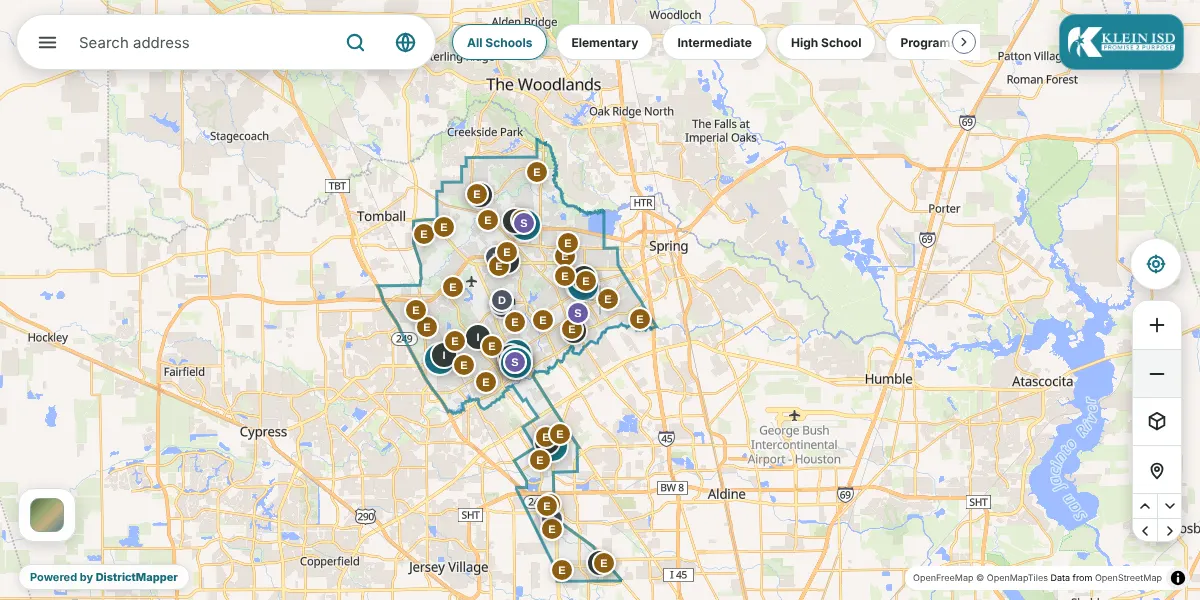
This is the real school map, on a real district site.
Klein ISD embeds this SchoolMap on its website with one line of code. Try an address: 7200 Spring Cypress Road, Klein, TX 77379
What DistrictMapper does
Help families choose a school
The path a family takes on your website, from finding a school to asking for a tour. Every tool below is included in every plan.
Step 1
Find
SchoolMapA family explores nearby schools. With district-approved attendance zones, they can also check which schools serve their address.
Step 2
Compare
SchoolCompareThey weigh their options side by side (programs, grades, seats) right where the decision gets made.
Step 3
Explore
ProgramDirectoryThey look into the magnet, CTE and special programs that fit their student, and see who's eligible.
Step 4
Tour
TourBookThey request a tour on your district’s page. Your team follows up and records what happens next.
Step 5
Enroll
Your SIS
The family enrolls through your district’s system. Staff record the outcome in TourBook, and its campaign results (GrowthKit) show which outreach helped.
Keep families informed
Behind the scenes
Events and board meetings
Included with the suite. Also sold on their own.
How it works
It goes on the website you already have.
Finalsite, Apptegy, Edlio, WordPress, Google Sites, SchoolMessenger Presence or any page with an HTML block. Your tools go live within 10 business days of receiving your data.
Sign in
Sign in at app.districtmapper.com. Your workspace starts with your district's schools and boundary from public data.
Upload or confirm your data
Check each school's profile, add programs and calendar feeds, and send your attendance boundaries as KML or GeoJSON if you want address lookup.
Paste one line
Copy a tool's snippet from the Publish & share page and paste it into a page on your website. Or send your webmaster the instructions the app writes for you.
Which accessibility deadline applies to your school district?
The ADA Title II web rule generally requires public entities’ web content and mobile apps to meet WCAG 2.1 Level AA. DistrictMapper targets WCAG 2.2 Level AA.
- Population of 50,000 or more
- Population under 50,000
City and county school districts use the city or county population. Independent school districts use the Census Bureau’s most recent Small Area Income and Poverty Estimates. Student enrollment alone does not determine the deadline.
The rule generally covers what a district puts on its website, including tools from vendors and documents such as PDFs. In OCR Case 09-17-1556 (opens in new window), a district’s “Elementary School Boundary Maps” page was cited by name.
Why it matters for enrollment
Families are comparing schools. Make yours easy to find and choose.
Keeping the students you have and recruiting new ones starts on your website: can a family find their school, compare their options, see your programs and ask for a tour without calling the front office?
- 74%
of parents considered switching schools last year
Source: NSCAF, June 2025
- ↓
Historic enrollment declines in Alabama, Iowa, and more
Source: K-12 Dive, Nov. 2025
- 3 states
expanded open enrollment in 2025 alone
Source: AR, NH & NV
The numbers we can back
Proof, not promises
Every figure below names its source, so your team can verify the case before it reaches procurement.
- 13,000+U.S. public school districts you can preview liveSource: federal NCES 2023–24 district list
- WCAG 2.2 AAOur accessibility target across the suiteRead our accessibility practices and the conformance report
- 27Product releases in the 90 days to November 23, 2026Source: our public changelog
Why districts choose us
Three reasons it works
One login, one dashboard
Not a stack of separate tools to wire together. One login, one dashboard, and a clear home for each kind of content. Maintain school profiles in SchoolBuilder, programs in ProgramDirectory, and brand assets in LogoKit; connected tools reuse that information wherever it applies. Embed them on your site by pasting one line of code, no GIS team needed.
Built from your chair
Every tool is shaped by the questions district offices answer every week: which school serves this address, what programs do you offer, how do I book a tour? Families get those answers on your website, not on the phone.
Accessible by default
WCAG 2.2 AA is our target across the suite. Review our accessibility practices and ask for the documentation your team needs. Accessibility is part of how we build, with no separate add-on fee.
Who's behind it
Built by someone who sat in the district's chair
Every product answers one question: what would have made my job easier?
- 15 years in K-12
- Large Texas district
- Former comms director
Try DistrictMapper with your own schools.
A free 90-day trial built from your real schools and map. Enter your email and we'll send a sign-in link once it's ready. The suite is priced by district enrollment, $2,500/year to $20,000/year, with every tier published.
Free for 90 days, no credit card. Sign in within 14 days to keep it. If you buy, everything you set up stays. Buying is an annual term with no setup fees and no automatic renewal.
Already have a website vendor? DistrictMapper works inside the website you already have: paste one embed line. See the embeds on a sample site.
First ADA Title II deadline: April 26, 2027